> ## Documentation Index
> Fetch the complete documentation index at: https://docs.rabbitpay.ai/llms.txt
> Use this file to discover all available pages before exploring further.
# abandoned-cart-recovery
> Recover abandoned Shopify checkouts with automated WhatsApp reminders and direct checkout links using RabbitPay.
Customers often leave the store after adding products to their cart or starting checkout without completing their purchase.
RabbitPay helps merchants recover these potential sales by sending **WhatsApp reminders** to customers who abandon their checkout. The customer can then return to their checkout using the **Complete Checkout** button and finish their purchase.
## Key Features
Send automated WhatsApp reminders to customers who leave their checkout incomplete.
Customers can return directly to their abandoned checkout using the recovery link.
View abandoned checkout records, customer details, products, amounts, and checkout status from RabbitPay.
Give high-intent customers another opportunity to complete the purchase instead of losing the sale.
## View Abandoned Checkouts
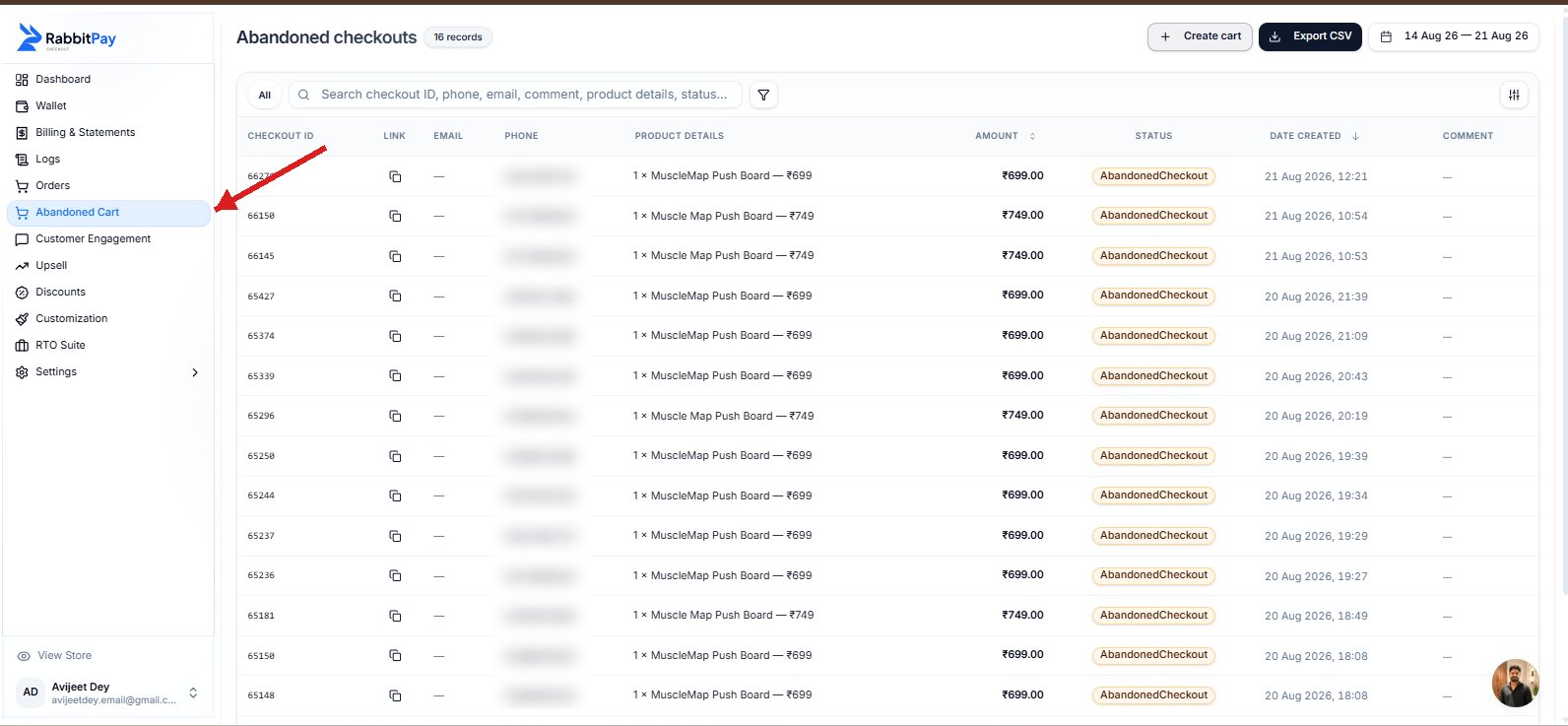
RabbitPay provides a dedicated **Abandoned Cart** section where merchants can view checkout sessions that were started but not completed.
You can see important information such as:
* Checkout ID
* Customer phone number
* Customer email
* Product details
* Order amount
* Checkout status
* Date and time the checkout was created
This makes it easier for merchants to identify abandoned checkouts and understand which customers and products are being lost during the checkout process.
 ## How Abandoned Cart Recovery Works
RabbitPay keeps the recovery process simple:
### 1. Customer Starts Checkout
A customer adds a product to their cart and proceeds to checkout.
### 2. Customer Leaves Without Completing the Order
If the customer does not complete the checkout, the checkout can be recorded as an **Abandoned Checkout** in RabbitPay.
### 3. WhatsApp Reminder Is Sent
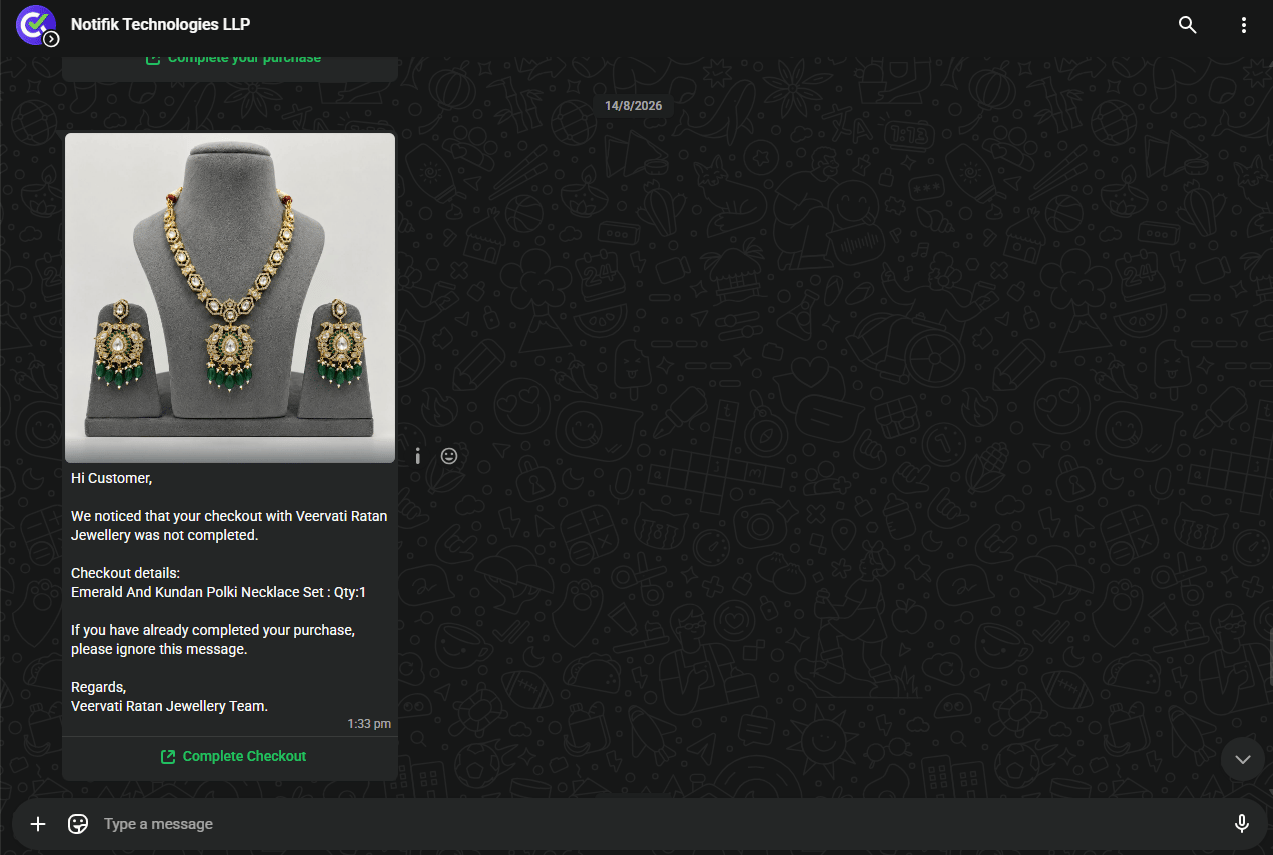
RabbitPay sends a WhatsApp reminder to the customer with details of the abandoned checkout.
The message can include:
* Customer greeting
* Product name
* Quantity
* Checkout information
* A **Complete Checkout** button
## How Abandoned Cart Recovery Works
RabbitPay keeps the recovery process simple:
### 1. Customer Starts Checkout
A customer adds a product to their cart and proceeds to checkout.
### 2. Customer Leaves Without Completing the Order
If the customer does not complete the checkout, the checkout can be recorded as an **Abandoned Checkout** in RabbitPay.
### 3. WhatsApp Reminder Is Sent
RabbitPay sends a WhatsApp reminder to the customer with details of the abandoned checkout.
The message can include:
* Customer greeting
* Product name
* Quantity
* Checkout information
* A **Complete Checkout** button
 ### 4. Customer Returns to Checkout
The customer can select **Complete Checkout** from the WhatsApp message.
This takes the customer back to the checkout flow so they can continue their purchase without having to search for the product again.
### 5. Customer Completes the Order
Once the customer completes the payment and places the order, the abandoned checkout is recovered.
## Why Recover Abandoned Checkouts?
Not every customer who leaves checkout has decided not to purchase. Customers may leave because they are distracted, need more time, face payment issues, or simply forget to complete the order.
A recovery message gives these customers another opportunity to finish the purchase.
Bring customers back to purchases they already started instead of losing the sale completely.
Send the recovery message directly through WhatsApp, making it easier for customers to notice and act on the reminder.
Give customers a simple way to return to checkout after they leave without completing their order.
Customers can continue their purchase directly from the recovery message without searching for the product again.
## What the Customer Receives
The WhatsApp recovery message contains the relevant checkout information so the customer knows what they left behind.
For example, the message can show the product name and quantity along with a **Complete Checkout** button.
This makes the next step clear and reduces the effort required for the customer to return and complete the purchase.
## Result
With RabbitPay Abandoned Cart Recovery:
**Customer abandons checkout → RabbitPay records the abandoned checkout → WhatsApp reminder is sent → Customer clicks Complete Checkout → Customer returns to checkout → Order is completed**
RabbitPay helps merchants turn abandoned checkout sessions into additional opportunities for completed orders.
The faster and simpler it is for a customer to return to checkout, the easier it is to recover a potential sale.
### 4. Customer Returns to Checkout
The customer can select **Complete Checkout** from the WhatsApp message.
This takes the customer back to the checkout flow so they can continue their purchase without having to search for the product again.
### 5. Customer Completes the Order
Once the customer completes the payment and places the order, the abandoned checkout is recovered.
## Why Recover Abandoned Checkouts?
Not every customer who leaves checkout has decided not to purchase. Customers may leave because they are distracted, need more time, face payment issues, or simply forget to complete the order.
A recovery message gives these customers another opportunity to finish the purchase.
Bring customers back to purchases they already started instead of losing the sale completely.
Send the recovery message directly through WhatsApp, making it easier for customers to notice and act on the reminder.
Give customers a simple way to return to checkout after they leave without completing their order.
Customers can continue their purchase directly from the recovery message without searching for the product again.
## What the Customer Receives
The WhatsApp recovery message contains the relevant checkout information so the customer knows what they left behind.
For example, the message can show the product name and quantity along with a **Complete Checkout** button.
This makes the next step clear and reduces the effort required for the customer to return and complete the purchase.
## Result
With RabbitPay Abandoned Cart Recovery:
**Customer abandons checkout → RabbitPay records the abandoned checkout → WhatsApp reminder is sent → Customer clicks Complete Checkout → Customer returns to checkout → Order is completed**
RabbitPay helps merchants turn abandoned checkout sessions into additional opportunities for completed orders.
The faster and simpler it is for a customer to return to checkout, the easier it is to recover a potential sale.